

Excel Modernization: Maintain, Automate or Move to Software
Excel Modernization: Maintain, Automate or Move to Software
18 Aug
A finance employee exports data from an ERP into Excel every Monday morning. An operations manager maintains a workbook with dozens of formulas. A controller relies on a VBA macro to reconcile transactions before sending the monthly report.
These spreadsheets may have started as simple productivity tools. Over time, they can become part of the company's operational infrastructure.
At the same time, employees now have access to AI coding tools that can turn an Excel-based process into a small application in days. That creates a new opportunity, but also a new risk when an employee-built solution becomes business-critical without professional software engineering, security or long-term ownership.
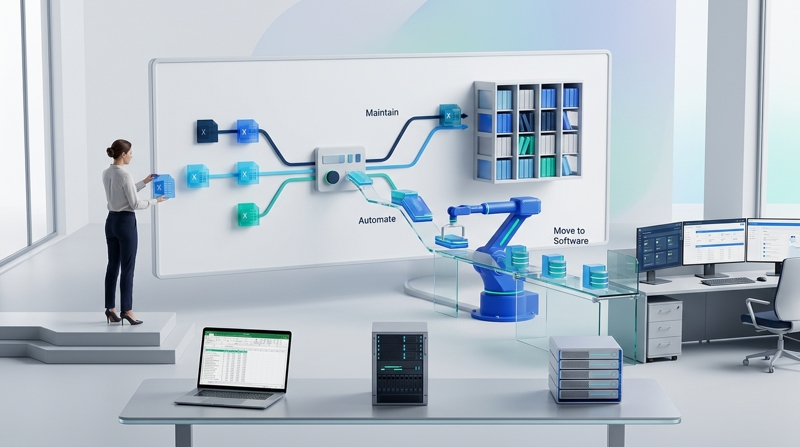
Excel does not always need to be replaced. The better question is whether the business should maintain it, optimize it, automate it, or move the underlying process to software.
From Spreadsheet to Business System
Excel becomes a different kind of technology when people depend on it to run a recurring business process. A workbook that calculates a forecast is one thing. A workbook that receives ERP data, transforms it, reconciles transactions and produces a management report is effectively part of the company's information system.
That distinction matters because the risks change when the spreadsheet becomes operationally critical.
- Multiple employees depend on the same workbook.
- Critical calculations depend on complex formulas or macros.
- Employees repeatedly copy information between systems.
- One person becomes responsible for maintaining the entire solution.
- An error in the spreadsheet can affect financial or operational decisions.
Excel Is Not the Problem
Excel remains an excellent tool for analysis, modelling, exploration and individual productivity. Replacing every spreadsheet with custom software would create unnecessary cost and complexity.
The objective of Excel modernization is therefore not to eliminate Excel. It is to make a deliberate decision about where Excel belongs in the process.
Keep Excel when it provides flexibility without creating material operational risk. Modernize it when the process has become repetitive, fragile or difficult to maintain.
Four Paths to Excel Modernization
There is no single modernization strategy. The right approach depends on the business process, the level of risk and the amount of manual work surrounding the spreadsheet.
| Situation | Best-fit approach |
|---|---|
| Excel works well for analysis or controlled calculations | Maintain Excel |
| The workbook is inefficient, complex or difficult to maintain | Optimize Excel |
| Employees spend time on repetitive imports, exports or data entry | Automate the Excel process |
| The process is business-critical, multi-user or too complex for a spreadsheet | Move the process to professional software |
The important decision is not which technology is newer. It is which approach produces the most reliable and sustainable business process.
Maintain or Optimize Excel Before Replacing It
Sometimes the best modernization project is a better Excel solution. A workbook may contain useful business logic but suffer from unnecessary formulas, poor structure, undocumented VBA or inefficient manual steps.
Optimization can include restructuring the workbook, improving formulas, documenting business rules, simplifying VBA, improving performance and reducing unnecessary manual work.
This approach can preserve the flexibility employees already understand while reducing the operational problems that have accumulated around the spreadsheet.
From VBA and VBScript to Modern Automation
Many companies have years of business knowledge embedded in VBA, macros or legacy scripts. These automations may still work, but changes to operating systems, applications, security policies or technology platforms can make them increasingly difficult to maintain.
The answer is not automatically to remove VBA. First identify what the automation does and how important it is to the business. Some automations should be maintained. Others should be modernized or replaced with APIs, workflow automation, services or a dedicated application.
- Document what the existing VBA or script actually does.
- Identify the systems and data it depends on.
- Determine whether the automation is business-critical.
- Identify dependencies on specific employees or machines.
- Choose between maintenance, modernization, replacement or migration.
Automate the Work Around Excel
Excel can remain the right interface while automation removes the repetitive work around it. Instead of asking employees to download files, clean data, copy values and upload results, systems can exchange information automatically.
For example, an Excel-based finance process can connect to an ERP, database, bank statement or API, collect the required information and prepare the workbook automatically. Employees can then focus on reviewing results instead of preparing the data.
This is often a better first step than immediately replacing the entire spreadsheet.
When Excel Should Become Software
A spreadsheet should be considered for migration when it has become a critical operational process rather than simply an analysis tool. Multiple users, complex workflows, audit requirements, integrations and dependency on one employee are strong signals.
Moving to software should not mean copying every spreadsheet cell into a web interface. The business process should be redesigned around proper application architecture, permissions, validation, audit trails, testing, monitoring and integration.
The result should be a business application that is easier to operate and maintain than the spreadsheet it replaces.
AI Changes Who Can Build Software
AI coding tools have changed the economics of internal software development. An employee who understands a business problem can now create a script, dashboard or application without waiting for a traditional development project.
That capability is valuable. Employees often know the process better than anyone else, and AI can help them prototype solutions quickly.
But a working prototype is not automatically production software.
From Employee Innovation to Shadow AI
The risk begins when an employee-built application becomes essential to the business without receiving the engineering practices normally applied to production software.
An application may have weak authentication, insufficient access controls, undocumented dependencies, limited testing, no monitoring, insecure integrations or no clear maintenance owner. The biggest problem may not appear immediately. It can surface when the original employee changes roles, leaves the company, or the application needs to integrate with another system.
Companies should not ban employees from experimenting with AI. They should create a path for successful experiments to receive technical, security and operational review before becoming business-critical systems.
AI Should Support the Process, Not Replace Good Judgment
AI can be useful throughout Excel modernization. It can help analyze legacy workbooks, understand formulas, document VBA, identify repetitive tasks and accelerate the development of automation.
AI can also add value inside the resulting process through document extraction, classification, matching, reconciliation, anomaly detection, forecasting and exception handling.
But AI should be introduced where it solves a real business problem. A conventional automation, API integration or well-designed application may be more appropriate when the process is deterministic.
Measure the Process Before Choosing the Technology
The decision to modernize Excel should be based on the process, not on the popularity of a technology. Before starting a project, understand where employees spend time and where operational risk is concentrated.
- Hours spent manually entering or preparing data.
- Time spent correcting spreadsheet errors.
- Frequency of imports, exports and reconciliations.
- Number of employees depending on the process.
- Number of systems involved in the workflow.
- Dependency on a single employee or undocumented VBA.
- Time required to produce recurring reports.
- Business impact when the process fails.
These measures make it easier to determine whether optimization, automation or a software project is justified.
Modernization Does Not Have to Be a Big-Bang Project
Excel modernization can happen progressively. Start by documenting a critical workbook. Remove unnecessary manual steps. Automate data collection. Modernize fragile VBA. Then move the most important capabilities into software when the business case is clear.
This approach allows companies to preserve what works while reducing technical and operational risk over time.
The final solution may be improved Excel, Excel combined with automation, Excel connected to APIs and AI, or a dedicated application. The right answer depends on the process.
Consulting Group Helps You Choose the Right Path
Consulting Group helps businesses assess Excel-based processes and determine what should be maintained, optimized, automated or transformed into software.
We can work with existing Excel and VBA solutions, modernize legacy automation, connect Excel with ERP systems and APIs, automate repetitive workflows, introduce AI where it creates measurable value, and professionally develop applications when a process has outgrown its spreadsheet.
The objective is simple: reduce wasted employee time without replacing technology unnecessarily.
Keep Excel when it works. Automate it when employees are wasting time. Modernize it when legacy technology becomes a risk. Move it to software when the business has outgrown it.


- Address
- 900 cure labelle laval
- Phone
- contact@consulting-group.ca